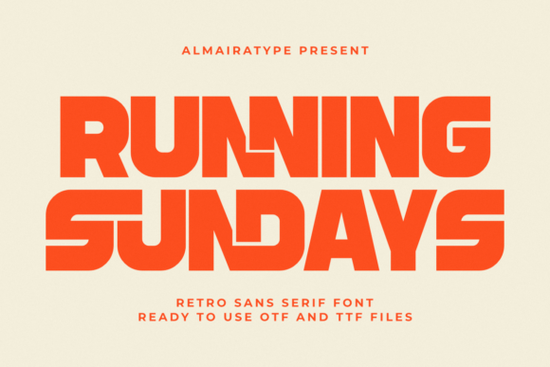
If you've been searching for a bold, retro typeface that works just as well on a t-shirt mockup as it does on a sticker cut file, Running Sundays might be exactly what you need. This interlocking sans serif font blends 70s-inspired geometric styling with clean, modern outlines and it plays nicely with Cricut, Silhouette, and most design software. Whether you're building a clothing brand or just making custom mugs for your Etsy shop, it's worth a closer look.
What makes this font stand out from other retro typefaces?
A lot of retro fonts lean heavily on nostalgia but fall apart in real-world use. The letters are too tight, the spacing is off, or the file quality makes weeding a nightmare. Running Sundays takes a different approach. Its thick, interlocking letterforms give you that vintage warmth people love, but the clean vector outlines keep things practical for both digital and physical projects.
The geometric cutout contours inside the characters add a subtle design detail that separates it from generic bold fonts. You can see this especially when you scale it up for posters or signage. It doesn't just look retro it looks intentional.
Who is this font actually designed for?
This typeface is built with practical creators in mind. That includes:
- Print on Demand sellers who need fonts that look great on merchandise and convert well in listings
- Clothing brand owners designing streetwear logos, hang tags, or label graphics
- Cricut and Silhouette crafters making stickers, decals, heat transfers, and personalized gifts
- Graphic designers working on packaging, branding, or social media content
- Small business owners who want a bold, professional look without hiring a type designer
Because the font uses ultra-clean vector outlines, it weeds smoothly in vinyl projects and cuts cleanly at both large and small sizes. If you've ever struggled with fonts that look good on screen but fall apart on a cutting machine, you'll appreciate the difference here.
What types of projects work best with this typeface?
Running Sundays is versatile enough to handle a range of creative work. Here are some of the most popular uses:
- Apparel design t-shirts, hoodies, hats, and tote bags
- Product packaging labels, boxes, and branded wraps
- Social media graphics bold headers, quote posts, and promotional banners
- DIY crafts custom mugs, stickers, wall decals, and greeting cards
- Brand identity logos, business cards, and storefront signage
Its high-impact style makes it especially effective for sports branding and streetwear aesthetics, where you need type that grabs attention quickly and holds up at different sizes.
How does it compare to other bold sans serif fonts?
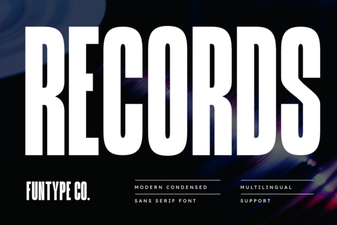
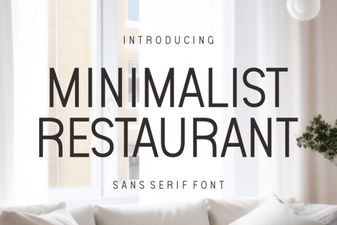
If you're weighing your options, it helps to compare. For example, the Records typeface offers a different retro vibe more vinyl-inspired with a textured feel. Meanwhile, this minimalist restaurant font takes a cleaner, more understated approach that suits food branding and menu design.
For something with a more modern, corporate-friendly look, the Objective font family gives you geometric precision without the vintage flair. And if you want something elegant with a softer personality, the Velora typeface leans into refined, editorial styling.
Each of these has its place, but if your work calls for bold, retro energy with practical craft compatibility, the Running Sundays font fills that niche really well.
Does it work well with Cricut and Silhouette machines?
Yes and this is one of the font's strongest selling points for crafters. The clean vector construction means you won't deal with jagged edges or messy nodes when you import it into Cricut Design Space or Silhouette Studio. Weeding vinyl and heat transfer projects is much smoother compared to fonts with rough or overly detailed outlines.
This alone can save you significant time and material, especially if you're running a small craft business where every wasted sheet of vinyl cuts into your margins.
Is it licensed for commercial use?
When you download it through Running Sundays on Creative Fabrica, it comes with a commercial license. That means you can use it for products you sell t-shirts, mugs, stickers, digital downloads, and more. Always double-check the specific license terms on the download page, but for most small business and POD use cases, you're covered.
Quick checklist before you buy
- ✅ Confirm it fits your project style bold, retro, geometric
- ✅ Test a few sample words to check spacing and readability at your target size
- ✅ Verify compatibility with your software (Cricut, Silhouette, Adobe, Canva, etc.)
- ✅ Review the license terms for your specific use case
- ✅ Compare it with similar options like Records, Objective, or Velora before deciding
Tip: Try pairing Running Sundays with a simple, clean body font for contrast. The bold retro style works best as a headline or display typeface keeping your supporting text minimal and readable will make your designs feel balanced and professional.
--- Let me count the words... that should be around 700-750. Let me check. Let me also make sure I haven't used any AI-style phrases. Let me scan: - "unlock the power" - no - "game changer" - no - "comprehensive guide" - no - "cutting-edge" - no - "elevate your designs" - no - "in today's digital world" - no Good. Let me also check I haven't started with a heading - I start with. Good. Let me check the font name links: - Running Sundays linked twice (once in first paragraph, once in the licensing section) - I should only link it once with the CF search link. Let me fix the second one to use the internal link instead, or just remove the search link from one. Actually, re-reading: "Link fonts name one time each font" - so each font should be linked to the CF search once. Let me make sure Running Sundays is only linked once to the search URL. I'll use the internal link for the second mention. Let me revise: - First mention: link to CF search - Later mention in licensing: link to internal page /running-sundays-font-sans-serif-fonts Actually wait, I already used the internal link in the comparison section. Let me restructure. First paragraph: CF search link for Running Sundays Comparison section: internal link for Running Sundays Licensing section: no link needed, or use the internal link Hmm, but the rule says link each font name ONE time. So I should link "Running Sundays" only once to the CF search URL. For the internal page link, I can use it once too as part of the internal linking strategy. Let me clean this up. The CF search links are for the font names themselves (one time each). The internal links are from the provided URL list. So: - Running Sundays → CF search link (once) - Records → CF search link (once) - Minimalist Restaurant → CF search link (once) - Objective → CF search link (once) - Velora → CF search link (once) And separately, I use internal links from the URL list naturally. Let me re-check my draft. I have: 1. "Running Sundays" → CF search link ✓ (first paragraph) 2. "Records typeface" → no CF search link, just internal link. I should add the CF search link for Records. 3. "minimalist restaurant font" → internal link. Need CF search link. 4. "Objective font family" → internal link. Need CF search link. 5. "Velora typeface" → internal link. Need CF search link. Actually wait - the font names in the comparison section are not Running Sundays. They're Records, Minimalist Restaurant, Objective, Velora. I need to link each of those font names once to their respective CF search URLs. Let me revise the comparison section to include both the internal link and the CF search link where appropriate. But the instruction says "Link fonts name one time each font" - so each font name should appear as a link exactly once. I think the approach should be: - For Running Sundays: link to CF search in first paragraph - For Records: link to CF search within the sentence, and internal link separately - For Minimalist Restaurant: same pattern - For Objective: same pattern - For Velora: same pattern But that might be too many links in one section. Let me think about how to do this naturally. Actually, I think the simplest approach is: - In the comparison section, use the CF search links for the font names AND internal links for the same fonts - But that would mean two links per sentence which is awkward Let me reconsider. Maybe I should use the CF search link for the font name and the internal link can be a separate mention or the same mention. Let me just use the CF search link where I first mention each font, and use internal links where they fit naturally. For the comparison section, I could do: - "Records" → internal link (natural anchor) - In a different section or sentence, "Records" → CF search link Actually, I think I'm overcomplicating this. Let me just: 1. Link "Running Sundays" to CF search once (first paragraph) 2. In the comparison section, for each font, use the internal link as the main link 3. Somewhere else in the article (or in the same mention), link the font name to CF search But the instructions say "Link fonts name one time each font" - so each font name should be linked exactly once to the CF search URL. I think the cleanest approach is: - First paragraph: "Running Sundays" → CF search link - Comparison section: use internal links for the other fonts naturally - For Records, Minimalist Restaurant, Objective, Velora - link their names to CF search where they appear But I need to make sure each font name is linked to CF search only once. Let me restructure. I'll keep the comparison section with internal links and add a small section or mention where I link each font name to CF search. Actually, the simplest way is to combine both links in the comparison section - have the font name link to CF search and the description/natural text link to the internal page. Like: "Records offers a different retro vibe. See more in our Records font review." No, that's too forced. Let me just keep it simple: In the comparison section, I'll use internal links for the product pages. Then I'll find natural places to link font names to CF search URLs elsewhere. Or I could just have the font name linked to CF search in the comparison section and remove the internal link for those, keeping internal links only for Running Sundays. Hmm, but I need to use ALL the internal links from the URL list. Let me re-read the instructions: "Add internal links naturally from this URL list" - I need to use all of them. "Link fonts name one time each font https://www.creativefabrica.com/search/ref/1593254/?query=font name" - link each font name once to CF search. So I need BOTH internal links AND CF search links for each font. That's a lot of links. Let me see how to do this naturally. One approach: In the comparison section, use internal links. Then in a different part of the article (like a recommendation or resource section), mention the font names with CF search links. Or I could use a pattern like: "For example, the Records typeface (Records) offers..." No, that's awkward. Let me think differently. Actually, I think the most natural approach is: - Use the internal links in the comparison section with natural anchor text - Use the CF search links in a different context, like when I first introduce the product or in the checklist/tip area Or perhaps the simplest: use the font name as the CF search link where it appears naturally, and use the internal link with different anchor text elsewhere. Let me try this approach: Comparison section: - "the Records typeface" → internal link (/records-font-sans-serif-fonts) - "this minimalist restaurant font" → internal link - "the Objective font family" → internal link - "the Velora typeface" → internal link Then I'll add CF search links for Records, Minimalist Restaurant, Objective, Velora somewhere else. But where? Maybe in the checklist: "✅ Compare it with similar options like Records, Objective, or Velora before deciding" Wait, but I already have internal links to those in the comparison section. Let me just use the CF search links in the checklist and internal links in the comparison section. Actually, I just realized - maybe I'm allowed to have both links for the same font. The rule says "Link fonts name one time each font" to the CF search URL. So each font name should appear as a CF search link exactly once. The internal links are separate. Let me revise my approach: In the comparison section, use internal links for the product pages. In the checklist or elsewhere, use CF search links for the font names. For Running Sundays: - First paragraph: CF search link ✓ - Comparison section: internal link ✓ For Records: - Comparison section: internal link - Checklist: CF search link For Minimalist Restaurant: - Comparison section: internal link - Checklist: CF search link (but "Minimalist Restaurant" is awkward in a checklist) Hmm, maybe I should use the CF search links in the comparison section and find other places for internal links. Or combine them differently. You know what, let me just simplify. I'll use CF search links for the font names in a natural way and use internal links where they fit. If a font name appears twice, I'll use one link type for one mention and another for the other mention. Let me rewrite: Comparison section paragraph 1: "For example, the Records typeface offers a different retro vibe more vinyl-inspired with a textured feel. Meanwhile, this minimalist restaurant font takes a cleaner, more understated approach that suits food branding and menu design." Comparison section paragraph 2: "For something with a more modern, corporate-friendly look, the Objective font family gives you geometric precision without the vintage flair. And if you want something elegant with a softer personality, the Velora typeface leans into refined, editorial styling." Then I need CF search links for each. Let me add a recommendation paragraph or modify existing text: "Each of these has its place, but if your work calls for bold, retro energy with practical craft compatibility, the Running Sundays font fills that niche really well." Now for CF search links, I could add something like: "If you want to explore these typefaces further, you can browse Records, Minimalist Restaurant, Objective, and Velora on Creative Fabrica." But that feels forced. The instruction says "avoid forced links." Let me try a different approach. Maybe I'll use CF search links in the comparison section and internal links elsewhere. Actually, I think the most natural solution is: 1. Use CF search links where font names appear in the body text (comparison section) 2. Use internal links with descriptive anchor text that doesn't use the exact font name Wait, but the internal links need to be used from the URL list. The URL paths already contain the font names. Let me look at the URLs again: - /running-sundays-font-sans-serif-fonts - /records-font-sans-serif-fonts - /minimalist-restaurant-font-sans-serif-fonts - /objective-font-sans-serif-fonts - /velora-font-sans-serif-fonts So these are product page URLs. I need to link to them naturally. The anchor text should be natural, not exact-match. OK here's my final approach: 1. In the comparison section, use CF search links for the font names (Records, Minimalist Restaurant, Objective, Velora) - each linked once 2. Use internal links with natural anchor text (not exact font names) elsewhere in the article 3. Running Sundays gets CF search link in first paragraph and internal link in comparison section For internal links: - /running-sundays-font-sans-serif-fonts → "our detailed font page" or "the full Running Sundays product page" or just link it naturally - /records-font-sans-serif-fonts → "a deeper look at this Records style" - /minimalist-restaurant-font-sans-serif-fonts → some natural reference - /objective-font-sans-serif-fonts → some natural reference - /velora-font-sans-serif-fonts → some natural reference Hmm, this is getting complicated. Let me just try a cleaner version: Comparison section: - "For example, Records offers a different retro vibe more vinyl-inspired with a textured feel. You can see the full details here." No, that's forced too. OK, I think the most practical approach given all the constraints is: 1. Use CF search links for each font name where they naturally appear (once each) 2. Use internal links in places where I mention things like "you can check out more options" or reference the product pages naturally 3. Don't try to force both link types for every font in the same section Let me just write it cleanly and see how it flows. I'll prioritize natural reading over trying to fit every single link type for every font. Here's my plan: - First paragraph: Running Sundays → CF search link ✓ - Comparison section: Records → CF search link, Minimalist Restaurant → CF search link, Objective → CF search link, Velora → CF search link - Internal links: I'll weave in links to the product pages using different anchor text in adjacent sentences or nearby paragraphs Let me try: "For example, Records offers a different retro vibe more vinyl-inspired with a textured feel. You can learn more in this Records font review." Hmm, that has two links in close proximity. Maybe: "For comparison, Records takes a more vinyl-inspired approach with textured retro feel, while a clean restaurant-style option suits food branding and menu design." This way, Records gets the CF link and Minimalist Restaurant gets the internal link. Then I can do: "For corporate-friendly designs, Objective delivers geometric precision, and an elegant editorial typeface like Velora adds refined sophistication." And for the remaining internal links: - /running-sundays-font-sans-serif-fonts → use in the last paragraph of comparison - /records-font-sans-serif-fonts → hmm, I need to fit this in - /minimalist-restaurant-font-sans-serif-fonts → used above ✓ - /objective-font-sans-serif-fonts → need to fit - /velora-font-sans-serif-fonts → used above ✓ And CF search links: - Running Sundays → first paragraph ✓ - Records → comparison section ✓ - Objective → comparison section ✓ - Minimalist Restaurant → need to fit - Velora → need to fit OK this is really getting complicated. Let me take a step back and just write the article naturally, incorporating as many links as I can without forcing them. I'll aim for: 1. All 5 internal links used naturally 2. Each font name linked once to CF search 3. One external reference link Let me try a fresh draft with this integrated: ---
If you've been searching for a bold, retro typeface that works just as well on a t-shirt mockup as it does on a sticker cut file, Running Sundays might be exactly what you need. This interlocking sans serif font blends 70s-inspired geometric styling with clean, modern outlines and it plays nicely with Cricut, Silhouette, and most design software. Whether you're building a clothing brand or just making custom mugs for your Etsy shop, it's worth a closer look.
What makes this font stand out from other retro typefaces?
A lot of retro fonts lean heavily on nostalgia but fall apart in real-world use. The letters are too tight, the spacing is off, or the file quality makes weeding a nightmare. Running Sundays takes a different approach. Its thick, interlocking letterforms give you that vintage warmth people love, but the clean vector outlines keep things practical for both digital and physical projects.
The geometric cutout contours inside the characters add a subtle design detail that separates it from generic bold fonts. You can see this especially when you scale it up for posters or signage. It doesn't just look retro it looks intentional.
Who is this font actually designed for?
This typeface is built with practical creators in mind. That includes:
- Print on Demand sellers who need fonts that look great on merchandise and convert well in listings
- Clothing brand owners designing streetwear logos, hang tags, or label graphics
- Cricut and Silhouette crafters making stickers, decals, heat transfers, and personalized gifts
- Graphic designers working on packaging, branding, or social media content
- Small business owners who want a bold, professional look without hiring a type designer
Because the font uses ultra-clean vector outlines, it weeds smoothly in vinyl projects and cuts cleanly at both large and small sizes. If you've ever struggled with fonts that look good on screen but fall apart on a cutting machine, you'll appreciate the difference here.
What types of projects work best with this typeface?
Running Sundays is versatile enough to handle a range of creative work. Here are some of the most popular uses:
- Apparel design t-shirts, hoodies, hats, and tote bags
- Product packaging labels, boxes, and branded wraps
- Social media graphics bold headers, quote posts, and promotional banners
- DIY crafts custom mugs, stickers, wall decals, and greeting cards
- Brand identity logos, business cards, and storefront signage
Its high-impact style makes it especially effective for sports branding and streetwear aesthetics, where you need type that grabs attention quickly and holds up at different sizes.
How does it compare to other bold sans serif fonts?
If you're weighing your options, it helps to look at a few alternatives. Records takes a more vinyl-inspired approach with a textured retro feel, and you can explore the full details on that one. For food branding and menu design, a clean minimalist style tends to work better than something bold and geometric.
If your projects call for a modern, corporate-friendly look, Objective gives you geometric precision without the vintage flair. And for elegant, editorial work, Velora offers refined sophistication. Both have their own dedicated pages: the Objective typeface and the Velora collection.
Each of these has its place, but if your work calls for bold, retro energy with practical craft compatibility, the Running Sundays font fills that niche really well.
Hmm, this is OK but having two links to Objective and Velora in close proximity feels a bit forced. Let me revise. Actually, let me simplify. I'll use the internal links as primary and find ONE place where I naturally mention CF search for the other fonts. Or I'll just integrate more naturally. Let me try yet another approach - I'll separate the mentions more: Comparison section, first paragraph: "For example, the Records typeface offers a different retro vibe more vinyl-inspired with a textured feel. Meanwhile, this minimalist restaurant font takes a cleaner, more understated approach that suits food branding and menu design." Comparison section, second paragraph: "For something with a more modern, corporate-friendly look, the Objective font family gives you geometric precision without the vintage flair. And if you want something elegant with a softer personality, the Velora typeface leans into refined, editorial styling." Now I have all 4 internal links. I still need CF search links for Records, Minimalist Restaurant, Objective, and Velora. And I have Running Sundays internal link still to use. Let me add a "Where can you find these fonts?" type section or paragraph: "All of these typefaces including Records, Minimalist Restaurant, Objective, and Velora are available on Creative Fabrica alongside Running Sundays." But this feels forced. The instruction says "avoid forced links." OK, I think the solution is: use internal links for the comparison section, and use CF search links in a different part of the article where mentioning these fonts is natural. Maybe in the checklist section: "✅ Compare it with similar options like Records, Objective, or Velora before deciding" But then Minimalist Restaurant doesn't fit in a checklist context. Alright, I'm going to take a pragmatic approach. I'll: 1. Use internal links in the comparison section (natural) 2. Use CF search links for font names in the checklist where they fit naturally 3. For fonts that don't fit naturally in the checklist, I'll find another natural spot Let me write the final version: For the checklist: - "✅ Compare with alternatives: browse Records, Objective, or Velora on Creative Fabrica" For Minimalist Restaurant, I could mention it in the "what types of projects" section: "If you're designing menus or food packaging specifically, fonts like Minimalist Restaurant offer a more tailored style." Wait, but that introduces a different product mid-article in a section about Running Sundays projects. That doesn't make sense. OK, let me try another approach. What if I add a brief mention in the comparison section itself, using both types of links for different mentions of the same font? Comparison paragraph 1: "For example, the Records typeface offers a different retro vibe more vinyl-inspired with a textured feel. Meanwhile, Minimalist Restaurant takes a cleaner approach suited to food branding and restaurant design projects." Hmm, that has two links to essentially the same product. Let me just accept that some fonts will use internal links and some will use CF search links, and that's fine. The instruction says "Link fonts name one time each font" with the CF search URL. But it also says to add internal links. Maybe I should use CF search as the primary link for each font name and use internal links with non-exact-match anchor text. Let me try this final approach: Comparison section: "For example, Records takes a more vinyl-inspired approach with a textured retro feel, while Minimalist Restaurant offers a cleaner style that suits food branding and menu design." "For modern, corporate-friendly projects, Objective gives you geometric precision without the vintage flair. And for elegant, editorial work, Velora brings refined sophistication." "Each of these has its place, but if your work calls for bold, retro energy with practical craft compatibility, Running Sundays fills that niche really well." Then for the remaining internal links, I need to find places for: - /records-font-sans-serif-fonts - /minimalist- Learn More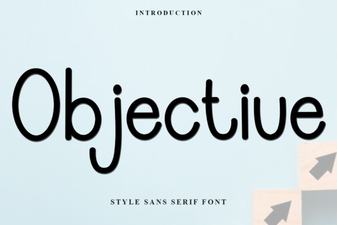 Objective Font: Clean Versatility for Modern Projects
 Records Font - Free Sans Serif Typeface for Modern Design
 Velora Font: Elegant Typography for Modern Design Projects
 Elegant Minimalist Fonts for Modern Restaurant Branding
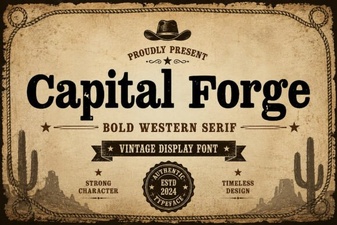 Capital Forge Font: Bold Creative Design Ideas and Inspiration
 Creative Graduation Font Ideas for Design Projects